🔢 Complete Reference

Social Media Character Limits 2026

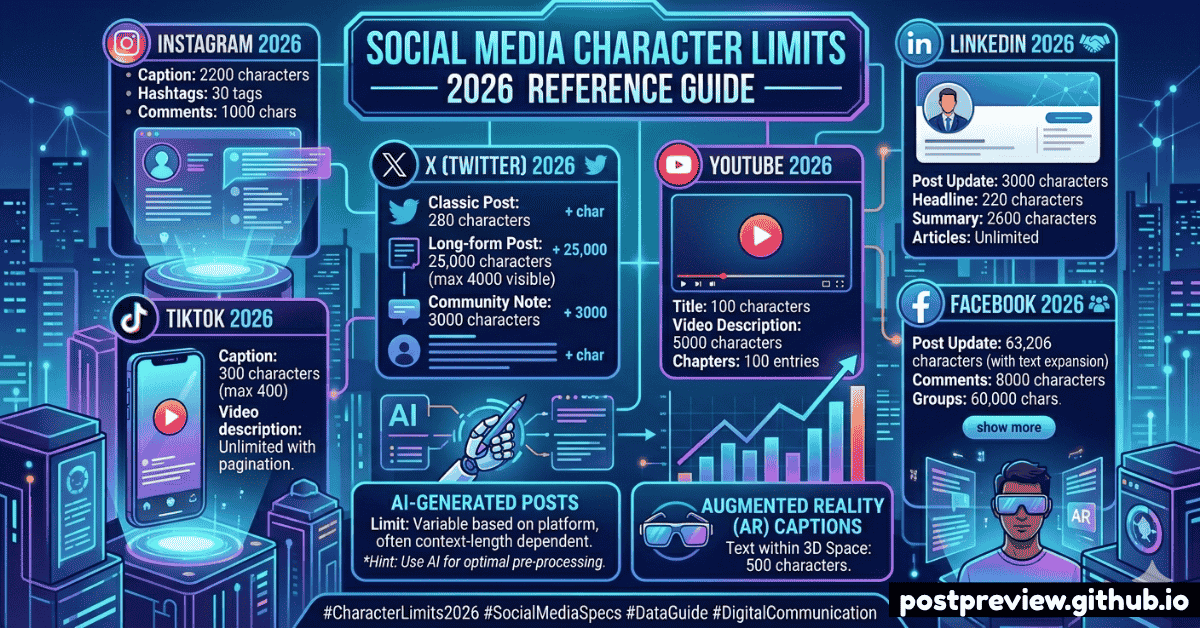
Every platform's character limit in one place. Stop cutting your captions short — know exactly how much space you have on every network.

📅 Updated April 2026
8 min read
✍️ By PostPreview Team
✨ All limits verified

Quick Reference: All Platform Limits at a Glance

Here's the complete, up-to-date character limit table for every major social media platform in 2026. Bookmark this page — we update it whenever platforms make changes.

Platform Post / Caption Bio / About Comment Space
𝕏 Twitter / X
280 160 280 Tight
📸 Instagram
2,200 150 2,200 Medium
📘 Facebook
63,206 101 8,000 Very High
💼 LinkedIn
3,000 2,000 1,250 Medium
🎵 TikTok
2,200 80 150 Medium
▶️ YouTube
5,000 1,000 10,000 High
📌 Pinterest
500 160 500 Medium
👻 Snapchat
250 150 Tight
💬 WhatsApp
65,536 139 Very High
🤖 Reddit
40,000 200 10,000 Very High

Twitter / X Character Limits

Twitter/X has the tightest character limits of any major platform, which is both a constraint and a creative challenge. Here's every limit you need to know:

𝕏
Twitter / X
Tweet text280 chars
Tweet (Premium)25,000 chars
Bio160 chars
Display name50 chars
Website URL100 chars
Direct message10,000 chars
💡 Twitter/X Pro Tips

URLs are always counted as 23 characters regardless of their actual length. Images, videos, and GIFs don't count toward your character limit. X Premium subscribers get 25,000 character long-form posts.

Instagram Character Limits

📸
Instagram
Caption2,200 chars
Visible before "more"~125 chars
Bio150 chars
Username30 chars
Hashtags per post30 max
Story text~220 chars
Reels title55 chars

Instagram captions can be up to 2,200 characters, but only the first ~125 characters are shown before the "more" truncation. This makes your caption hook critical — front-load your most important information.

Facebook Character Limits

📘
Facebook
Post text63,206 chars
Visible before truncation477 chars
Page About255 chars
Personal bio101 chars
Comment8,000 chars
Group name75 chars
Event name64 chars

LinkedIn Character Limits

💼
LinkedIn
Post text3,000 chars
Visible before "see more"~210 chars
Headline220 chars
About / Summary2,000 chars
Comment1,250 chars
Article title100 chars
Company name100 chars

Writing Within Character Limits: Expert Tips

✂️
Front-load your hook
Put your most compelling line first. Most platforms truncate captions after 125–477 characters, so make those first words count.
🔗
Use URL shorteners
On Twitter/X, all URLs count as 23 characters automatically. On other platforms, short URLs save characters and look cleaner.
📝
Write long, then edit down
Write everything you want to say first, then cut ruthlessly. Every word should earn its place. Aim for 80% of the character limit.
🧵
Use threads for long content
Twitter threads, LinkedIn articles, and Facebook Notes let you go deeper without squeezing everything into one post.
👁
Preview before publishing
Use PostPreview to see exactly how your caption will be truncated on each platform before you hit post. Saves time and embarrassment.
🎯
One message, one post
The tighter the character limit, the more focused your message needs to be. Trying to say two things in 280 characters never works well.
🔢

Never Exceed a Limit Again

PostPreview counts your characters in real-time and shows you exactly how your post will look on each platform.

Try PostPreview Free →