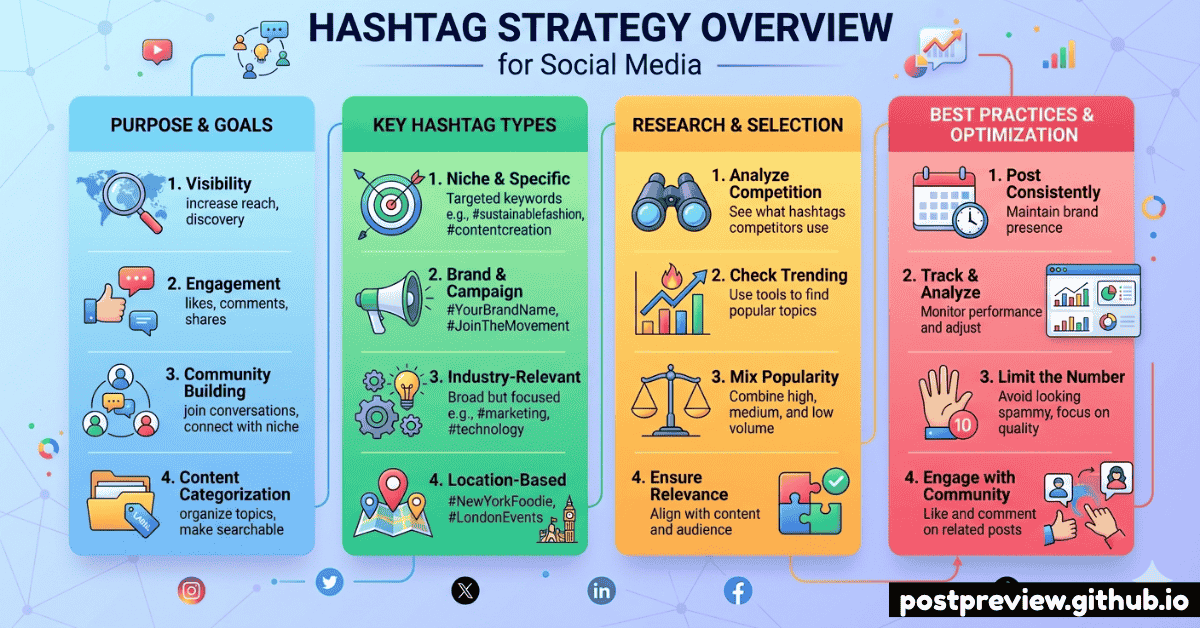
Do Hashtags Still Matter in 2026?
The short answer: yes — but the playbook has changed. Platforms have shifted from treating hashtags as a major ranking signal to using them primarily as a content-categorisation and discovery tool. Stuffing 30 hashtags into every caption no longer boosts reach; in many cases it actively reduces it.
What hashtags still do well in 2026: help algorithms understand what your content is about, make your posts appear in search results and topic feeds, and connect you with niche communities who are already interested in your subject matter.
💡 The 2026 Hashtag Mindset
Think of hashtags as keywords, not megaphones. Five perfectly chosen, relevant hashtags will consistently outperform thirty generic ones. Quality and specificity beat quantity every time.
Quick Reference: Recommended Hashtag Counts
Here's the at-a-glance table for every major platform. Jump to the full section for detailed dos and don'ts for each one.
| Platform |
Recommended |
Maximum |
Placement |
Impact Level |
📸 Instagram |
3 – 5 |
30 |
Caption or comment |
Medium |
🎵 TikTok |
3 – 7 |
No set limit |
Caption |
Medium |
💼 LinkedIn |
3 – 5 |
~30 |
End of post |
High |
𝕏 Twitter / X |
1 – 2 |
— |
Inline in tweet |
Low–Medium |
📘 Facebook |
1 – 3 |
~30 |
Caption or comment |
Low |
📌 Pinterest |
2 – 5 |
20 |
Pin description |
Medium |
▶️ YouTube |
3 – 8 |
15 shown |
Description / title |
Medium |
Instagram Hashtags in 2026
TikTok Hashtags in 2026
LinkedIn Hashtags in 2026
The Size Strategy: Mixing Reach Levels
One of the most effective (and underused) hashtag tactics is mixing hashtags by post volume. Here's why each tier matters and how to combine them:
🌍
Mega
1M+ posts
Extremely high competition. Your content gets buried within seconds. Brand awareness only.
0–1 per post
🏙️
Large
100K – 1M
Competitive but useful for topic signalling. Helps the algorithm categorise your content correctly.
1 per post
🏘️
Medium
10K – 100K
The sweet spot. Enough volume for real discovery, low enough competition that you can rank in the feed.
1–2 per post ★
🏡
Niche
1K – 10K
Highly targeted community tags. Reach is smaller but far more qualified — exactly the audience you want.
1–2 per post ★
🎯 The Ideal Mix (Instagram Example)
#Photography (Large — 800M posts) · signals topic to algorithm
#PortraitPhotography (Medium — 75M posts) · reaches engaged photography fans
#FilmPortrait (Niche — 250K posts) · reaches your precise target audience
#YourBrandName (Branded) · builds searchable community around you
How to Find the Right Hashtags
The best hashtag strategy is only as good as your research. Here's a repeatable 5-step process to find hashtags that actually drive relevant reach:
1
Search your core topic directly on the platform
Type your main keyword into the platform's search bar. Look at the hashtags it auto-suggests — these are the ones the platform has determined are most associated with that topic. Note the follower/post count for each.
2
Analyse your top 5–10 competitors' best posts
Look at the posts with the highest engagement on accounts similar to yours. Which hashtags appear consistently? If those tags are working for similar content targeting a similar audience, they're worth testing.
3
Check each hashtag's content quality before using it
Tap on a hashtag and scroll through the top posts. Does the content quality match yours? Is the community active and engaged, or is it flooded with spam? Hashtags with poor-quality content have poor-quality audiences.
4
Verify no hashtags are banned or restricted
Search the hashtag and look for a banner saying content is hidden or the hashtag is restricted. Using a banned hashtag can suppress your entire post. If you're unsure, skip it.
5
Build 3–4 rotating sets and track performance
Create multiple sets of 3–5 hashtags around your content pillars. Rotate between sets each week to avoid spam signals from identical repetition. Check your analytics monthly to see which sets drive the most non-follower reach.
7 Hashtag Mistakes Killing Your Reach
🚫
Using the same hashtags on every single post
Repeating an identical set of hashtags on every post is treated as spam behaviour by algorithms. Build at least 3 rotating sets around your main topics and switch between them regularly.
🚫
Chasing volume over relevance
A hashtag with 500 million posts will bury your content in seconds. The goal is to be discovered by the right people, not the most people. Choose precision over scale.
🚫
Using banned or restricted hashtags
Banned hashtags can suppress your entire post's visibility — not just the hashtag itself. Always check a new hashtag before first use by viewing its feed for restriction warnings.
🚫
Adding hashtags that are irrelevant to your content
Tagging #travel on a software post to get extra views backfires. It sends wrong audience signals to the algorithm and results in high bounce rates from the wrong viewers — actively hurting your ranking.
🚫
Joining trending topics without genuine relevance
Hijacking trending hashtags for unrelated content damages brand credibility and can result in negative engagement. Only use trending tags if your content is genuinely part of that conversation.
🚫
Never tracking which hashtags are actually working
Most platforms show "Reach from Hashtags" in post analytics. If you never check this, you're flying blind. Review monthly, drop underperformers, and double down on what drives real discovery.
🚫
Ignoring platform-specific rules
What works on Instagram doesn't work on LinkedIn. Using 15 hashtags on Twitter/X, or skipping hashtags on LinkedIn entirely, means you're leaving significant discovery on the table. Tailor your approach to each platform.
Pro Tips for Better Hashtag Performance
🏷️
Create a branded hashtag
A unique branded hashtag builds a searchable library of your content and community UGC. Promote it in your bio, in every post, and in Stories. Once followers adopt it, it compounds your reach for free.
📅
Lean into seasonal hashtags
Plan seasonal and event-based hashtags into your content calendar. Holiday, awareness month, and cultural moment hashtags create natural discovery spikes when timed correctly.
🌍
Add location hashtags when relevant
Local businesses and location-based content see strong results from city and region hashtags. A restaurant in Manchester should always include #ManchesterFood and #ManchesterEats.
🔍
Follow your own hashtags
Following hashtags you use lets you monitor the community, spot trending content in your niche, and engage with posts that appear in those feeds — signalling relevance to the algorithm.
📊
A/B test hashtag sets monthly
Test Set A on one post, Set B on the next comparable post. Compare non-follower reach after 48 hours. Over months, this data tells you exactly which sets perform best for each content type.
👁
Preview captions before posting
Always check how your hashtags look in the actual platform feed before publishing. Too many hashtags can make a caption look cluttered and hurt engagement. PostPreview shows you exactly what followers will see.
Frequently Asked Questions
How many hashtags should I use on Instagram in 2026? ▾
Instagram officially recommends 3–5 hashtags per post. Research consistently shows this outperforms the old strategy of using 20–30. Quality and relevance matter far more than quantity — five perfectly chosen tags will outperform thirty generic ones every time.
Do hashtags still work on TikTok in 2026? ▾
Yes, but TikTok's algorithm is primarily interest-graph driven. Hashtags help categorise content but are not the main reach driver. Use 3–5 niche and community hashtags. Avoid #fyp and #foryoupage — TikTok has explicitly stated these have no impact on For You Page placement.
Should I put hashtags in the caption or first comment on Instagram? ▾
Both work equally well for reach in 2026. Placing tags in the caption may index the post marginally faster. Placing them in the first comment keeps the caption visually clean. It's entirely a personal preference decision.
What is a hashtag shadowban and how do I avoid it? ▾
A shadowban is when a platform silently reduces your content's visibility without notifying you. Common causes include using banned or restricted hashtags, copying identical hashtag sets on every post, receiving multiple spam reports, and engagement pod activity. Always check hashtags before first use and rotate your sets to stay clean.
How do I know if my hashtags are actually working? ▾
Check your post analytics for "Impressions from Hashtags" (Instagram) or "Reach from Hashtags." On Instagram business/creator accounts this data is shown per post. Track which hashtag sets correlate with higher non-follower reach over time, and cut sets that consistently underperform.
Does using #fyp on TikTok help get on the For You Page? ▾
No. TikTok has officially confirmed that #fyp, #foryou, and #foryoupage have no impact on For You Page placement. These hashtags have billions of posts attached to them, provide no targeting value, and are effectively wasted characters in your caption.
How often should I change my hashtag sets? ▾
Build 3–4 sets and rotate through them weekly. This prevents spam signals from identical repetition. Do a deeper audit monthly — review analytics, retire underperforming hashtags, and introduce new ones to test. Every 3 months do a full hashtag strategy review.
#️⃣
Preview Your Hashtag Captions Before You Post
See exactly how your captions — hashtags and all — will look in each platform's feed before you publish. No surprises, no awkward truncations, no guesswork.
Try PostPreview Free →